About PM4Web

The PM4Web blog was born as an outlet to return knowledge back to the web development community. My goal is to share my experiences as a project manager from over the years in a manner which helps you succeed with your own projects.
Showing posts with label requirements gathering. Show all posts

09 September, 2009

Writing a Design Brief

Questions to ask before undertaking any creative project.

Comedian Chris Rock mused in one of his stand-up shows that "you can drive a car with your feet if you want to; it don't mean it's a good idea!" The same can be said for starting a creative endeavor without first taking down a design brief; you can certainly do it, but that doesn't make it a good idea.

What's a design brief meant to do? The idea behind the design brief process is to tease out what the client has in mind. It's meant to extract the visual communication requirements of the project. Whether it's the creation of a website or a brochure, the questions answered during the process will act as a guide for the development of the end product.

Why is a design brief even needed you may ask, can't we just 'wing it' and see how it turns out? After all, creativity shouldn't be constrained by bureaucratic procedure. This is definitely true, you don't want to apply stringent protocols to a creative endeavor, it can actually stifle the flow of creative juices. That said, a design brief is about moving from a vague idea to something firm that everyone can agree on. It's about moving away from "I'll know what I like when I see it" to a shared sense of the project's purpose.

Should you run into the attitude of "just get on with it", it falls upon you to explain the importance of undertaking the briefing session. Something along these lines should suffice: "the design brief session takes about 15-25 minutes. It needs to be done so I can produce a high quality product for you."

So what does a design brief document look like, and how do you conduct the briefing session? The template I use is a simple Word document about a page and a half long. It consists of 15 questions. There is also a preamble section with a short paragraph describing the document's purpose and another one on why the design brief is needed. On average, the briefing session itself takes about 20-30 minutes to complete. It can be done in the board room or at a cafe, it makes no difference since its an interview-style format.

Let's take a look at some of questions you may want to include in your own design brief document. I should state that this template is best suited to smaller projects, like the creation of a ad for a niche magazine, or the development of a business website presence. It won't cut it for that Coca-Cola campaign you're pitching for. It's simple enough for anyone to use, not just professional graphic designers.

Target audience - You are trying to find out who the material is intended for. You want to know things like the audiences' age, gender ratio, locality (national vs. international), occupation, etc. Why would such information be relevant? Take age for instance, if you were making a business card which is destined to be handed to seniors, it wouldn't be a good idea to use a tiny font on it.

Organization background - you should have a basic understanding of what your client's business does. Getting a brief history of your client's business will give context to the work you are doing.

Communication objectives - what message is are you trying to convey? What feeling or metaphors reflect the spirit of the product or company? For example; is the client going for a corporatey image or something more fun and friendly?

Market positioning - this connects closely to communication objectives. Is the client trying to appear like a big established company or an innovative new-comer? Do they want to appear as an international player or something more exclusive?

Business objectives - what is the client actually trying to do with this piece of marketing material? Is it meant to act as a sales tool, is it meant to encourage inquires, or is it meant to promote brand awareness?

Overall design goals - is the client going for continuity with their existing marketing material or are they trying to establish a new brand or product?

Keywords indicative of the product - this is an opportunity to get some alignment with what your client has in mind. For example; you may ask "what are some words that describe the logo I'm designing for you?", the client may come back with "simple, credible, professional".

Colors - is there a company style guide you need to follow? It could be that the client has some particular colors they wants you to try out. Otherwise, you would state you intend to stick with the existing corporate branding color scheme.

Hierarchy of information - what should grab the audience's attention first? This question is especially relevant for websites. Take a website selling a new product, you would expect the 'call to action' to have a very prominent position on the homepage.

Where to find inspiration - ask the client to show you examples of work similar to the style they want used for the project. With a website, you may ask "can you show me some websites you like?"

Design examples - it’s not enough to just see the examples, you want to find out what the client likes or dislikes about them (e.g. "its a simple design, I like that" or "our competitors website is cluttered with text"). There could be many aspects which appeal to your client, including: color, imagery, typography, atmosphere, etc.

Artwork and content readiness - its best to find out early if things like logos are available in a high-res digital format, or if the copy text is ready. This often serves as a heads-up to the client, letting them know they have work to do as well (i.e. preparing the content for their website). It may also act as a signal to indicate a copywriter is needed on the project.

Time constraints - its vital to know when the work has to be ready. Your client may have an expo coming up which requires brochures to be printed and ready before-hand.

Budget and resource constraints - how much time and money is available for the project? There has to be some kind of alignment between your client's expectations and what you can deliver based on their budget and deadline. You may even find you can't take on the project, better to know this early on than commit to something you can't achieve.

Language to use - should the text appearing in the product be informal, corportey, inspirational, emotive? This may not be relevant to you if a copywriter is involved in the project.

Dilbert, graphic design department rushed

As mentioned earlier, the design brief acts as a guide. It should be looked at periodically at various stages of the project to make sure you're on track. It should also be reviewed when the product is completed, to check that the original objectives of the project have truly been met.

Join RSS FeedSubscribe to RSS Feed.

07 June, 2009

From Requirements to Production

Reviewing the process which takes place from requirements gathering all the way up to production.

Every small web development agency is unique in some way, this is usually what gives them some kind of competitive advantage. Part of that uniqueness is the process they use to convert what a client wants into reality (e.g. a website). This article discusses that process in a big picture kind way, the main focus is on roles - or who does what.

I've seen a few versions of this process at different companies I've worked at, but they mostly involve the same players each time (e.g. a sales rep, a project manager, etc).

Most small web agencies could say their work is divided into two arenas: small web projects and custom development. Small web projects would be basic websites such a business web presence. A custom software build covers all other scenarios (e.g. where a lot of code is written to account for the client’s unique business rules).

The processes described in this article are most relevant to the small web projects stream, mainly because this kind of work is generally the same thing over and over again (e.g. client: "I would like an about us page, and a contact page...").

The players – before we begin the discussion in earnest, we should establish the roles in the process, or 'who does what'. Job responsibilities often go hand-in-hand with a job title, but not always. So, lets introduce the players:

The Players

In the first approach, which I like to call the split-role approach, the process unfolds as follows:

  1. BDM sells web solution to client.

  2. Business Analyst contacts the client to take-down their requirements (and then hands that over to the Project Manager)

  3. The Project Manager organises production resources.

Split-role approach

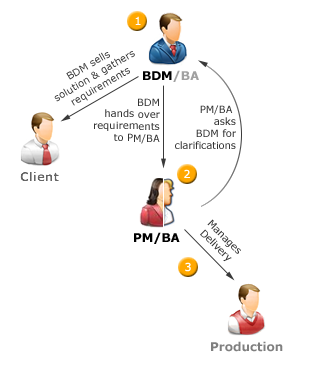
The alternative method is called the dual-role approach, which looks like this:

  1. BDM sells web solution to client.

  2. BDM gathers requirements from client and hands it over to the Project Manager.

  3. PM/BA reviews requirements (and often asks BDM to gather a few more details).

  4. PM organises resources and ensures delivery

Dual-role approach

I should mention that I specifically haven’t represented the iterative nature of development in either diagram (for the sake of simplifying the diagram).

Each approach has certain strengths and weaknesses. The most obvious difference between the two structures is that the dual-role approach combines the jobs of a Business Analyst and PM into one individual. The benefit of this is it cuts out one communication channel. The downside is it can be hard to find an employee with evenly matched business analysis and project management skills.

The dual-role approach also requires that the BDM have business analyst-like abilities, not as refined as a true business Analyst, but pretty savvy none-the-less. The fact that the BDM is capturing basic requirements takes a load off the PM/BA combined role, allowing them to effectively manage more concurrent projects.

Since the BDM is acting as a watered-down Business Analyst, its likely that the Project Manager/Business Analyst will often need to get clarifications on the requirements which have been gathered. For instance, the BDM may write down: "the client wants to put their products online", to which the PM/BA may say "does the client want to sell their products online, or do they just want an online product catalogue?"

The biggest concern for the BDM/BA combined role is that the skills needed to be a good BDM and a good Business Analyst aren't the same. Most BDMs aren't as structured in their thinking (which is needed to gather solid requirements), but then again most BAs don’t have the soft-skills a BDM generally has.

Pricing considerations - since we are dealing with basic website builds here, it is fine for a BDM to provide a client with a ball-park estimate at the initial client meeting. The final pricing does need to be settled by a proper Business Analyst though, they are the only ones that can cost the project with the least amount of risk.

There is also the issue of up-selling and business re-engineering. On the one-hand, a Business Analyst consulting directly with a client may improve the technology solution by making useful suggestions (split-role approach). The flip side would be a BDM is more likely to get a greater budgetary commitment from the client, due to their selling expertise (the dual-role solution).

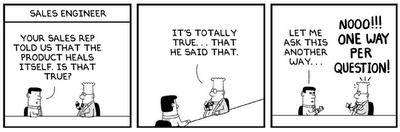
Dilbert - Sales Engineer

Personally I prefer the duel-role approach since it reduces the number of communication channels (or 'integration points'). The more communication channels, the greater the risk of losing information or misinterpretations. In addition, small companies generally can't afford to hire specialists (i.e. a specific person for a Business Analyst role, another person for the PM role). I can however appreciate that the split-role approach offers some degree of scalability since there is more division of labour.

Special thanks to members of the Stack Overflow community for their contributions towards this article.

Join RSS FeedSubscribe to RSS Feed.

14 November, 2008

The Scourge of Unnecessary Meetings

Tactics for reducing time spent in unnecessary meetings.

As a project manager that used to be a programmer, I can recall how much I loathed sitting in meetings. My train of thought was commonly along these lines; “why am I in this meeting talking about the project when I could be out there coding it?” Because of this, I do my best not to subject programmers to meetings unless it's absolutely necessary. Obviously not all managers come from a technical background, so this empathic understanding may not be present.

Ad-hoc meetings are a growing trend, but its not always convenient for three or more people to stand around discussing the details of multiple projects in an open-plan environment. When it’s realized that an impromptu discussion is probably disrupting other people around you, the common suggestion is “lets take this to the boardroom”. Now you have an ad-hoc meeting which has become the real thing, a meeting which can potentially turn into a lengthy discussion.

This brings us to the topic of written agendas, some swear by them, but are they in keeping with the spirit of Agile? Having someone write up an agenda is added bureaucracy. For short meetings at least, I believe agendas can be substituted with presence of mind and self-discipline. You need to be able to say two things in a meeting without being viewed as negative; “we’re getting off track here” and “we need to move on to the next item”.

Ideally, a project manager should do everything they can to shield programmers from meetings. If operational management is going directly to programmers for project status updates, then the project manager isn’t being allowed to do their job properly. It is not unreasonable to expect a project manager to know exactly how a project is progressing at any given point in time.

How does a project manager keep abreast of project status? Simple, by maintaining a project schedule which programmers go into 1-2 times per week and update their particular sections (e.g. when Jane finishes the validation for the sign-up form, she marks the task as 100% complete). Most other situations can be handled as one-on-one meetings, by email, or via MSN.

The only time all programmers need to be in one room at the same time is when they all have to talk to each other. Senior programmers must bare an additional burden; they are commonly needed in meetings to provide technical expertise.

Development team meetings are an exception; by this I mean meetings with nothing but programmers in them. These meetings are rarely superfluous, programmers will be itching to get back to their computers and continue with their work so they wont waste time on unnecessary matters.

I hear you saying “but if you keep programmers out of meetings, they wont interact with other staff and wont know what’s happening in other departments”. You can’t cajole a team to ‘jell’ by putting it into a contrived environment such as a meeting, which is an inherently formal situation anyway.

You’re more likely to build a sense of internal community by organizing events which are obviously social gatherings (e.g. everyone leaves the office at 4.30pm to go for pizza and bowling). Another way is to provide a pleasantly furnished communal eating area where people can sit and chat during lunch time.

I have seen it suggested that coders answer project status queries by saying something like; “it’s in the bug log”, or “it’s on the wiki”, or “I sent you an email about that”. Even if you assume a manager understood the reasoning behind such a statement, it’s still mildly rude at best and politically insensitive. Perhaps a better version would be “I’m happy to meet with you to discuss it, but it is in the bug log. And to be honest, I would much rather be coding so we can delivered sooner”. Would such a statement work? Who knows, but at least it wouldn’t come across as being negative.

Using MSN as a communication tool is a topic of potentially heated debate. Some companies ban it outright, others embrace it and reap the benefits. I have been at one company where everyone had it on their machines and it worked-out just fine.

Admittedly, sending a message like “can I talk to you when you’re free?” to a person sitting three feet away does feel kind of weird. However, walking over and interrupting them midway through a task is likely to break their train of thought or disturb others sitting near by. There is a degree of ‘knowing what a person likes’ here, if you know a person prefers emails, send them emails, if a person prefers face-to-face discussions, so be it, accommodate them.

At the risk of being facetious, I would say programmers love MSN. This is because it offers a degree of control. An instant message can be left for a few minutes without being answered and doesn’t break concentration the same way verbal interruptions do. I’d say MSN is more suited to specific questions like “will the file upload feature be ready today?” rather then vague queries like “how’s the project going?”

MSN is also great for giving simple instructions like “a friendly reminder Tom, I need you to go into the project schedule today and update your areas” or “the client has logged a few bugs, I’ve assigned them to you, go get them when you’re ready.”

The main danger managers see with allowing programmers to have MSN installed on their computer is that they will talk to their friends; and they will, but sometimes you have to take the good with the bad. Personally, I fritter away maybe 20 minutes per day talking to friends on MSN (e.g. “did you go for a ride on the weekend?”, etc). The problem is when the amount of time spent on MSN becomes inordinate (e.g. 2 hours plus), but this is a matter of self-discipline and only occasionally affects some programmers.

Now we come to one of the most disturbing causes of unnecessary meetings, ones which have been called for the sole purpose of stroking a manager’s ego (nb. this may be on a subconscious level). Tom DeMarco in Peopleware calls these 'status meetings'; not because they are about getting the latest status on a project, but because they are about affirming the bosses 'bossness' status within the organisation. There may be little that can be done about this situation, after all, they are the boss right?

I have seen one company where the managing director would have weekly meetings which went for an hour. During each meeting, he mostly talked at people. Programmers said maybe four or five words in total during the meeting, this was a good indicator they didn’t need to be there.

Dilbert Meetings

The bottom line is meetings are here to stay, including the unnecessary ones. This is simply a product of a corporate environment, managers are social beasts who like to talk, programmers are technical beings who like to code.

I have seen programmers suggest other approaches for alleviating the blight of unnecessary meetings. For example; require that an agenda exist before accepting the meeting request, insist off-topic items be discussed at another time, keep a log of time spent in meetings to use as ‘evidence against your boss’ when projects slip, etc. All idealistic and pragmatic, but unfortunately whilst the balance of power remains with the managers, the tilt will remain towards verbal communication.

17 October, 2008

Needs Analysis for Business Websites

Questions to ask your client before building their website.

This article is most relevant to people who develop standard websites (e.g. a business’ web presence). If your main focus is web-based applications, this paper may have limited appeal.

Client input is the foundation upon which successful web sites are built. It’s absolutely vital that you get your client to articulate their goals in order for you to successfully deliver their project . To help facilitate this process, a number of questions can be asked relating to areas such as target audience, desired look and feel, and what interactive functionality is required.

A good way to tease out your client’s requirements is to use a Needs Analysis document. This is basically a 2-3 page fill in form, full of questions which prompt the client to think about not just the visual elements of their site, but what they are trying to achieve in concrete business terms.

Using a Needs Analysis form provides many benefits. It often acts as the basis for developing a fee proposal or tender (see Writing Fee Proposals). Unless you know what it is your client wants, you wont be able to cost it with any degree of accuracy. Another advantage of a Needs Analysis form is it can present ideas to the client which they hadn’t previously thought of. This isn’t just a boon in terms of up-selling, it also means features aren’t added mid-way or at the end of a project (e.g. client: “I know you’ve finished my website, but can you just quickly add a photo gallery page?”).

The Needs Analysis form I use is broken up into five sections; Company Details, Graphic Design, Business Related, Technical Requirements, and Programmed Features. I will cover some of the questions contained in each section along with the over-all structure of the form.

I always start documents with a short description of what the document is. This is for the benefit of anyone seeing it for the first time (e.g. Document Purpose: this form is used to gather client requirements...).

Company Details – this section is pretty straight-forward, you record information such as the company name, who the main contact is, address, phone numbers, the client’s position within the organisation, etc. It’s also a good idea to note down any other stake-holders that will be involved in the project, and if the primary contact is able to give approval for the work to begin.

The information gathered in the Company Details section will most likely be needed for producing a quote. It will be especially useful if a sales consultant or business development manager is gathering requirements to hand over to a project manager. From this, the project manager will be able to figure out who's who on a project.

Graphic Design – this section is meant to capture details relating to the website’s visual appearance. It is not so much concerned with layout and colour, but rather communication. The information gathered in this section will be most useful to a graphic designer. Good questions to ask the client include; ‘what image are you trying to portray?’ (e.g. friendly, corporate, innovative, etc), ‘what phrase would best describe your website once it’s launched?’ (e.g. ‘these guys look really professional’), ‘what’s the main goal of your website?’ (e.g. sell products online), ‘what else are you trying to achieve with your website?’ (e.g. promote skin cancer awareness amongst young people), ‘what would you like users to do at your website?’ (e.g. register, buy products, etc).

You also want to ask if the client’s logo and branding material is ready. Your graphic designer will want to get his hands on any digital files as soon as possible (e.g. logos, product photographs, etc). Connected to this, you may want to ask the client if they have a style guide. The topic of Flash vs. static HTML also needs to be discussed since there may be SEO and cost implications.

Another important subject is the intended audience of the website. Questions you could ask include; who is your intended audience? what’s their typical occupation?, what is their age range?, is it mostly male or female?, how often do they use the Internet?

You can ask the client to show you some websites they like and have them explain what it is about each site that appeals to them (e.g. client: “I like the clean layout of the site”, “the animated banner is really cool”, etc). If you know that your client likes a particular style of navigation, it makes sense to use that style for their website.

Notice that none of these questions have to do with layout or color schemes (e.g. where the navigation should be, what font should be use, etc). These considerations should be left to the graphic designer, after-all, they are the expert.

Business Related – these questions aren’t directly connected to the visual appearance or functionality of the website, but they may have an impact on the project itself. For instance, you would want to ask questions like: is your content ready?, how are you planning to market your website once it launches?, are you open to developing in stages to manage costs?, do you require an SEO strategy?, are there time constraints (e.g. client: “we need it ready before we go to a trade show in November”, or “we are printing a brochure next month and want to refer to the website”)?

You may wish to ask a few questions about the client’s competitors, such as; do your competitors have websites? what do you like about your competitor’s websites?, what do you dislike about your competitor’s website? Sometimes finding out what someone doesn’t like can be a great help in determining what they do want.

Probably the most significant of the business related questions is about content. Lack of content can be a real killer. A wonderful website may be developed, but if the content isn’t ready, the site is effectively in limbo. One way to help reduce the risk of this happening is to recommend early on that the client engage a content publisher.

Technical Requirements – these questions are mostly system administration related. For instance; you want to find out if the client already has a hosting provider organised. You also need to know if the client has registered their domain name or if they want you to register additional web addresses on their behalf.

Programmed Features – this section covers the interactive elements of the website. Probably the most important goal of this section is to establish the information architecture of the site. This can be done by asking the client what sections their website should have (e.g. press releases, our work, testimonials, etc). The client may also have a need for interactive pages which require custom coding (e.g. sign-up form, news articles, member’s login, photo gallery, etc).

Other significant questions would include; are you planning to sell anything online?, do you require a CMS?, does your site need to work with an existing database?

Dilbert- user requirements

You’ll generally find that only about 80% of the form’s questions are relevant to any particular project. That being the case, it makes sense to remove or cross-out irrelevant questions before meeting with your client (e.g. you would probably know before-hand if any e-commerce facilities are needed).

Another idea is to pre-fill as much of the form as possible. Besides the obvious benefit of saving time in the face-to-face meeting, it demonstrates you’ve paid attention to verbal requirements which may have already been discussed.